Raspbian vs Raspberry Pi OS

Raspbian vs Raspberry Pi OS

Raspian.orgI’ve always referred to the version of Debian running on a Raspberry Pi as Raspbian and so it was until the recent 8 GB RAM Raspberry Pi was launched.  But it turns out that Raspbian was an independent version of Debian created by people at raspbian.org.  As they say “Note: Raspbian is not affiliated with the Raspberry Pi Foundation. Raspbian was created by a small, dedicated team of developers that are fans of the Raspberry Pi hardware, the educational goals of the Raspberry Pi Foundation and, of course, the Debian Project.
From now on, it seems the correct name is Raspberry Pi OS and no longer Raspbian. The change was announced at the bottom of this Raspberry Pi Foundation blog post. This has something to do with the fact that Raspbian is mainly 32-bit while the Raspberry Pi OS is both 32-bit and 64-bit though the latter is still at beta. You can read more about the recent changes to Raspberry Pi OS on this blog entry.

A very small sort in C

A very small sort in C

Tiniest sort in CI came across this article on efforts to make the smallest sort function in C.  Being cynical I did wonder if it would compile and run. I mean 56 bytes is kind of short!

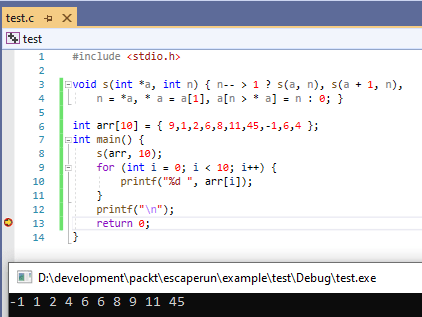
To get it to compile in VS 2019 I had to add a couple of changes, mainly ints and the void. This is it wrapped in a program. The screenshot shows it running and the output at the bottom. Very clever!

The sort function is that void s(… at the top.


#include <stdio.h>

void s(int *a, int n) { n-- > 1 ? s(a, n), s(a + 1, n), 
     n = *a, * a = a[1], a[n > * a] = n : 0; }

int arr[10] = { 9,1,2,6,8,11,45,-1,6,4 };
int main() {
	s(arr, 10);
	for (int i = 0; i < 10; i++) {
		printf("%d ", arr[i]);
	}
	printf("\n");
	return 0;
}

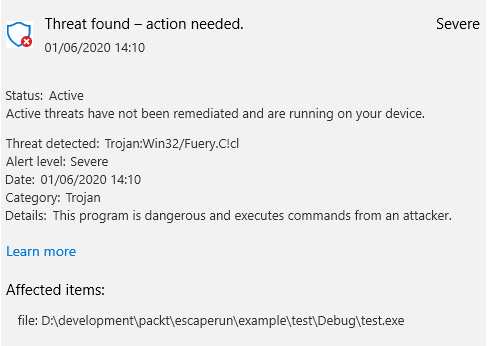
What I didn’t show you is the number of times Windows defender went ape and declared it a trojan, every time it compiled! My PC is kept pretty bug free and this is a false positive…

A trojan

Looking at Intrinsics in C

Looking at Intrinsics in C

AVX Registers
From WikiMedia. https://commons.wikimedia.org/wiki/File:AVX_registers.svg

This post probably has the most mystifying title yet. Here’s a little background. Modern CPUs have some hardware that can speed up operations like addition or multiplication by doing them in parallel. The words SIMD (short for Single Instruction Multiple Data) and vectorization apply.

These are very processor specific. Even something like x86-64 CPUS have a whole raft of alphabet soup. SSE, MMX, AVX. Intel even have a website so you can see what instructions are supported with examples in C.

My i5930K CPU supports AVX so if you tick the AVX box on the left hand side of the Intel intrinsics guide, you  can see can there are something like 12,000+ instructions and variants listed. If you tick one of the categories, it filters out the instructions to those applicable to that category.

Click one of the instructions on the right and you’ll see a rough equivalent in C to what it does. Also the header that it is found in, typically

#include <immintrin.h>

which  Visual C++ is happy to compile. An intrinsic is a special C instruction that gives you access to these low level vectorization instructions without you having to drop into assembler.

On a Raspberry Pi, the ARM processor supports a similar type of scheme but it’s called NEON.

If you are interested in finding out more, take a look at Microsoft’s intrinsics documentation which covers both Intel and ARM.


Working with SDL_ttf

Working with SDL_ttf

Font set
Image by Gordon Johnson from Pixabay

I’ve decided that I should use SDL_ttf in my games. I had previously incorrectly thought that using it would lead to a performance hit and wrote my own printch and TextAt functions which with a fixed-with (monospaced) font saved as a bitmap worked ok.

However after reading up on this, I see that the main routine for outputting text returns a SDL_Surface. This is an in-ram structure.

SDL_Surface *TTF_RenderText_Solid(TTF_Font *font, const char *text, SDL_Color fg)

The significance of this is that you pre-render all text strings as much as possible then convert them to SDL_Textures which moves the structures into VRAM. That means those strings can be blitted as fast as my string method. It’s less flexible says when printing numbers, so it might make sense to output a monospaced font of digits in the desired colour and font size  (I call it a digitset) and prepare all the digit sets that you need. I’ll create a test program…

PS. This is my 100th blog entry! Here’s to the next 100….

Developing a game for the SNES

Developing a game for the SNES

Yoyo Shjuriken home made SNES gameThis isn’t about me for a change, but I thought it well worth a mention. For those who have never played with a SNES, it’s a Nintendo console from the early 90s. All the games were cartridge based and I loved games like Super Mario World, Legend of Zelda (I finished that) and Secret of Mana.

There are emulators around now’ I have one that runs on an Orange Pi (Chinese brand of Raspberry -Pi compatibles) and if you can get the SNES game roms (mostly illegal BTW!), you can play those games on it.

The reason I mention it, unlike older SNES games which were programmed in 65816 assembler, the developer (Dr Ludos) programmed it in C. Apparently there is only one C compiler that you can use called tcc816 and it needs PVSNESLIB. I’m not sure which of those two links has the better tcc816 though I suspect it’s PVSNESLIB.

This bloke also made his own cartridges which is pretty amazing. I used to know somebody who worked in a firm where they developed SNES games and apparently Nintendo’s quality control was such that the completed game had to include video of 27 hours of play to show that the game wouldn’t crash.  Given the cost of producing the thousands of cartridges, it’s understandable.

Cartridges stopped people copying them and had a higher profit margin, but its kind of ironic now that a 1,000 SNES games can easily fit on a minuscule SD card.


Expanding my virtual hard disk

Expanding my virtual hard disk

filelight utility running on UbuntuMost Linux development is done on Ubuntu running under Hyper-V on my Windows 10 PC. If you have lots of RAM (and I have a full 64 GB), it’s very convenient. I run Snagit on Windows and this makes it very easy to grab screenshots of the Ubuntu window.

I also have a “Raspberry-pi” running under Hyper-V.  There’s a Raspbian desktop that you can download and run in Hyper-V, VirtualBox or VMWare though I’ve only done Hyper-V. Don’t forget when you are running a Raspberry Pi this way that its x86 based not ARM. That does affect the available software, so it doesn’t behave exactly like a real Pi though often close enough.

Today though I started getting low disk space from my virtual Ubuntu. That’s the problem with virtual machines. When you first setup a Virtual hard disk, you never know just how much disk space you will need.

There’s a terminal command that shows how much space you have left.

df -h --total

This produced this

david@david-Virtual-Machine:~$ df -h --total
Filesystem      Size  Used Avail Use% Mounted on
udev            942M     0  942M   0% /dev
tmpfs           193M  1.4M  192M   1% /run
/dev/sda1        11G  9.9G  603M  95% /
tmpfs           964M     0  964M   0% /dev/shm
tmpfs           5.0M     0  5.0M   0% /run/lock
tmpfs           964M     0  964M   0% /sys/fs/cgroup
/dev/sda15      105M  3.6M  101M   4% /boot/efi
tmpfs           193M   16K  193M   1% /run/user/121
tmpfs           193M   24K  193M   1% /run/user/1000
total            14G  9.9G  4.1G  71% -

This was after I’d extended my virtual hard disk.  You can see I now have 4.1 GB free.

The pretty picture is from a utility filelight. You install it in the usual way

sudo apt install filelight

Or if you prefer a more visual insight, install qdirstat.

sudo apt install qdirstat

This is like WinDirStat on Windows but qdirstat seems to run many times faster. It took a couple of seconds to produce this image below. WinDirStat would take 10-30 minutes.

qdirstat


So how did I expand my Hyper-V hard drive?

First you have to get rid of any checkpoints. Save your Hyper-V session if open then delete the checkpoint.

Delete Hyper-V checkpointRight click on the checkpoint for the selected VM and click delete. This will take a minute or two and you’ll see it have a Merging status. You may need to shutdown the VM.

After that you can go into the settings and it will let you edit the virtual hard drive and change the size.

John Conways Game of Life

John Conways Game of Life

Golly - Life simulatorAn English mathematician John Conway (who died not that long ago) came up with a very simple cellular automaton that he called Life. This was back in the 1970s and I remember finding his original article in Scientific American while at University.

We had no internet then and I whiled away 10 or so hours trying to make my version of Life run faster. Given that this was 1978 and it was written in BASIC, it’s not surprising that it only did a couple of generations per second on a mainframe. They didn’t give us much CPU time and it was an ICL 1900. My iPhone is probably more powerful!

The rules are simple enough to implement but it’s unlikely you’ll outperform Golly which is what the image shows. That’s written in C++ and has been under near continuous development for the last 15 years.

But part of the fun is writing your own life simulator and watching the patterns explode. I’d call it the minecraft of its day given the amount of computing time spent on this since the 1970s. There are some amazing creations all following these three simple rules.

  • Any live cell with two or three live neighbours survives.
  • Any dead cell with three live neighbours becomes a live cell.
  • All other live cells die in the next generation. Similarly, all other dead cells stay dead.

The grid is just a simple bit field. Each cell is either on or off and the rules determine if new cells are created or if patterns die out.

There are innumerable ones on the web. Here for example is a C/SDL version. Note, it uses SDL1. When I get the time, I’ll build and run it. Comments are in French!

Raspberry Pi 4B with 8 GB RAM on sale

Raspberry Pi 4B with 8 GB RAM on sale

Raspberry-Pi
Image by Benjamin Nelan from Pixabay

I won’t be buying one for the moment but I mention it for another reason. 4 GB is the maximum RAM that a 32-bit OS can use, and on the PI like on Windows it’s actually 3 GB. To be fair you can have two processes each with 3 GB on the 8 GB Pi.

The announcement did mention that a beta 64-bit Raspbian OS is available for download and it’s here. This article shows that the 64-bit Os they tested is faster on the Pi than 32-bit.  This link to the DietPi forum tells you how to boot dietpi into 64-bit.

It’s to be hoped that 64-bit ARM development software will become available. Clang and gcc should be but I’m thinking of the code.headmelted.com version of Visual Studio Code.

As always if you are buying a Raspberry Pi 4B, I strongly suggest you get a case with a fan. They are not expensive and do make a difference. Despite running the Asteroids game, which is pretty intense, I have never got my 4B temperature above 51C. THat said I’ve ordered a touchscreen with a case for a 4B on the back and it doesn’t seem to take a fan. So it will be interesting to see what its like fanless. More on that when the touchscreen arrives.


Function pointers in C and understanding them

Function pointers in C and understanding them

function pointers
Image by 준원 서 from Pixabay

In theory function pointers are straightforward. You have a pointer which is assigned to a function. You then make a call indirectly to that function. But, it’s when the function has parameters passed in and returns things that the definition  gets messy. Reading them is hard enough but trying to get it right when you are writing them can waste a lot of time.

Most days I read various websites and one of those is the C programming forum on reddit.com.  This has either articles or links to articles an one that was recently posted is about C function pointers and includes a very extensive list of definitions and what they mean with nearly 40 different examples of both legal and not legal examples. The examples are handy; just make sure you don’t use an illegal one. It won’t compile!