Author: David

More notes on my Webassembly web development with Blazor

More notes on my Webassembly web development with Blazor

Web networking
Image by Gerd Altmann from Pixabay

This is another post in the Inselkampf series. Having spent much of my career creating “desktop” application, web always feels a bit different. If it’s a website then HTML/CSS/PHP + MySql is a reasonable way of working. But when its a web application like a browser game that uses a SQL database, then there’s a bit of architecting involved.

I’m using Blazor because it lets me write C# that runs in the browser. I’ve never been a JavaScript fan though I realise many people are. I also have to use database. As I’ve said before Blazor gives you two choices- The WebAssembly version that runs completely in the browser and the Server version that talks to a server using a protocol called SignalR.

I’m trying to be clever by using the WebAssembly version but having the C# talk to a restful interface. Restful just means it has a bunch of http calls to do things like update, fetch data, login etc. On the server runs a ASP.NET program implementing this. It’s headless, as in its not outputting any webpages to the browser but just returns data in JSON (or maybe MessagePack).

This avoids having a SignalR connection for every user logged into the site which is one way to bring a server to its knees. When you create a Blazor Server application, it has a few disadvantages. As Microsoft says: when you use Blazor server.

  • Higher latency usually exists. Every user interaction involves a network hop.
  • There’s no offline support. If the client connection fails, the app stops working.
  • Scalability is challenging for apps with many users. The server must manage multiple client connections and handle client state.
  • An ASP.NET Core server is required to serve the app. Serverless deployment scenarios aren’t possible, such as serving the app from a Content Delivery Network (CDN).

I’m also not using the Microsoft authentication but rolling my own. Yes it’s possibly not perfect but I’ve done it before. This way I get to generate recovery numbers. (Both GitHub and Gmail offer these). A bunch of one off codes that are used to authenticate you, if you’ve lost your password or messed up your email then you login with your account number and an authentication code. This is the only way you get to change email and/or password. You just have to keep the codes safe.

Rolling my own Interface

So things like logging in, getting current status, updating game play are all done by making a call to an HTTPS routine. This is all behind the scenes so players see nothing. Values are sent as POST parameters and also include a nonce. This word (that unfortunately means sex offender in UK English!) , refers to a special code that has to be supplied with each call to the server to authenticate it. Successful logging in returns a nonce that has to be added as a parameter with every call to the server.

The program on the server that serves the restful calls is a simple ASP.NET Razor pages application (Well maybe Razor, I’m not sure if I need them). Behind the scenes I’m using MySQL which was installed as part of VirtualMin (the excellent software I use to setup the VPS).

Simple but effective optimisation in C

Simple but effective optimisation in C

StopwatchHere’s a short program. It repeats a loop twice, indexing through a text string a million times adding up the value. Instead of starting the total at 0, I set it to the outer loop index, to try and reduce the scope for immediate optimisation.
#include<stdio.h>
#include <string.h>
#include "hr_time.h"

stopWatch s;

char* testString = "This is a rather long string just to prove a point";
int main()
{
    int total = 0;
    startTimer(&s);
    for (int i = 0; i < 1000000; i++) {
        total = i;
        for (int index = 0; index < (int)strlen(testString); index++) {
            total += testString[index];
        }
    }
    stopTimer(&s);
    printf("Total =%d Took %8.5f\n", total, getElapsedTime(&s));

    startTimer(&s);
    int len = (int)strlen(testString);
    for (int i = 0; i < 1000000; i++) {
        total = i;
        for (int index = 0; index < len; index++) {
            total += testString[index];
        }
    }
    stopTimer(&s);
    printf("Total =%d Took %8.5f\n",total, getElapsedTime(&s));
    return 0;
}

I compiled and ran it twice, once in Debug and once in Release mode on Windows using MSVC.

Debug:

Total =1004673 Took 0.55710
Total =1004673 Took 0.11465

Release

Total =1004673 Took  0.00762
Total =1004673 Took  0.00765

Clearly in Release compilation, the compiler is smart enough to realise that it can optimise strlen(testString) away so there’s no difference between the two times. But in debug it’s clear that calling strlen() inside a for loop is relatively slow.

I compiled it and ran it with clang on Ubuntu 20.04 in the Hyper-V VM. The times with default optimization were

0.18370 
0.10644

and with “-O3” added to the compile line for maximum optimisation,. this changed to

0.0762
0.0745

which is almost identical to the Windows release compile times.

Portable Life in C

Portable Life in C

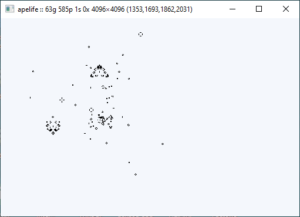
apelifeI’ve mentioned Life before, this is the cellular automata as discovered by John Horton Conway. It’s perhaps less of a game and more of a recreation for anyone fascinated by programming. It’s hard to add up how many man-hours have been spent on it.

Developer Justine Tunney (aka Jart on Github) has developed a portable Life called Apelife. Portable as in it can run on Windows (graphically) and Linux (Text User Interface). The application is a modest 112 KB in size and is one of the fastest I’ve seen. When you have a large area and gliders whizz across it, you know its fast.

She is also the author of Cosmopolitan C which Apelife uses.  It lets gcc outputs portable binaries that will run on every Linux distro in addition to Mac OS X, Windows NT, FreeBSD, OpenBSD, and NetBSD. It’s rather ingenious.


Added a tutorial on memory use in C

Added a tutorial on memory use in C

RAM BoardYou can read the tutorial here. It looks at the different ways memory is used in a C program. Do you know for instance what BSS is and when it is used compared to Data or where variables in a function declared static are held in memory?

I also tried overwriting a text literal out of curiosity to see what happens. Here’s the source:

#include<stdio.h>
#include <string.h>

char* name="My name is David";
int main()
{    
    strcpy_s(name,10, "New name");
    printf("Name = %s\n", name);
    return 0;
}

 
As you’d expect it blew up”

Work in Progress – Web game

Work in Progress – Web game

Blazor AppI did some investigative work on this at the weekend, This is my Inselkampf type web game. Although I know C#, I’m fairly new to ASP.NET and Blazor. Now the first thing you’ll notice about most Blazor examples on the web is that many look like the screenshot. In particular, the purple gradient down the left hand side.

So my first job was find out where that’s defined and try changing it. In the project which is Blazor WebAssembly, there’s a shared folder and it contains two .css files. MainLayout.razor.css and NavMenu.razor.css. These are the files you need to alter.

Now its probably seven or eight years since I last touched CSS and it has come on quite a bit since then. I discovered css-grid which simplifies things enormously.  If you want to find out more about CSS, take a look on FreeCodeCamp.org. This site has lots of example layouts using CSS-Grid and I went for Redefining Grid Areas with Media Queries. 

This lets you specify a width so you can have a responsive website which adapts to mobile phones as well as desktop. I merged the css and HTML from the example into the project and although its an early stage, I’m quite pleased with it.

Game framework This is very early. The font, colours etc will all change but this has given me a web template with round corners, header, footer and two sidebars.

If I shrink the width of the browser the two sidebars move to positions above and below the main content like this below. It would have taken a lot more effort before css-grid to do this.

Narrow game framework


Free Windows 10 VM

Free Windows 10 VM

Windows running in Hyper-VYou can get a special developer enabled VM of Windows 10 for VMWareHyper-VVirtualBox, and Parallels. This VM has a time limited version, expiring in April 2021 of Windows 10 (2004 version), and includes Visual Studio with the UWP, .NET desktop, and Azure workflows enabled and also includes the Windows Template Studio extension, Visual Studio Code, plus Windows Subsystem for Linux enabled with Ubuntu installed and Developer mode enabled.

It’s a 20 GB download that you can get here. The screenshot is Window 10 (fully licensed!) running under Hyper-V. I keep some old development software on it that’s a real pain to reinstall. I just have to keep it backed up and can easily copy it to my next PC. Much less hassle!


Slay Tutorial four published

Slay Tutorial four published

Debug ModeTutorial four of my reimagining of the game Slay continues.

This was an interesting bit of code to write, particularly setting the player hexagons. Then I tried to do too much in one go, adding the forts at the same time. I split this into separate functions.

It makes extensive use of recursion and that handy trick when you work with hexagons, the IsValidHex() function which tells you which six of the surrounding eight locations are valid. This is needed because the map is stored in a 2d array so in a 3×3 block, the centre location is surrounded by eight locations.

When you use hexagons, it’s more like a brick wall with each alternate row moved over a bit.  Now every location is surrounded by six adjacent locations just like in a hexagon grid. It turns out that a very simple function can tell you which of the 8 surrounding locations are valid.

In the grid I’m using, which runs in rows horizontally either 1,3 or 5,7 cells are invalid depending on whether the row is odd or even.

Here is a normal block of 3 x 3 locations.

7 0 1
6 x 2
5 4 3

But if I slide it over by 2 characters you get this.

  7 0 1     or     7 0 1
 6 x 2               6 x 2
  5 4            5 4 3

So by ignoring the bold locations, you can simulate a hexagon grid.

I’ve also added Debug mode which toggles with the tab key and introduced a blockId to each hex so you can see which hexes are lumped together. In Debug mode, the BlockId is printed out over the hex as in the screenshot. I’ve used the SDL_ttf library to draw the text. It slows down the screen update by a factor of 40x but is just fast enough to do 60 frames per second.

It’s interesting that the Ubuntu code running under Hyper-V is actually a lot faster than the Windows code.  As with previous tutorials, the code includes conditional compilation so it will compile and run under Windows or Linux.

Note, this code is not quite perfect. It now has three bugs:

  1. The map generator occasionally produces a map with a 2nd smaller continent separated by one hex from the main continent.
  2. Toggling Debug mode a lot makes it behave oddly. I thought I’d fixed that but I’m not so sure.
  3. Some blocks of contiguous hexes (all the same colour) lack forts.
Approaching the first year anniversary

Approaching the first year anniversary

Skyline for David-h-bolton on GitHub
GitHub Skyline for David-H-Bolton in 2020

In answer to an email I received, yes I do write all of the blog entries, tutorials and curate the collections on here. This will be blog #365 published since Feb 29th 2020.  You can see links to all posts by moving your mouse over the About Me in the top menu.

The odd looking graphic is a thing that is running on GitHub called Skyline. It shows a 3D city like model generated from your GitHub commits.  Mine for 2020 is this which you can zoom in and rotate, all with your mouse.  Just change the link to point to your account home page on GitHub. I think it’s quite neat and perfect timing for my first anniversary.

The slab I guess is a timeline from left to right and shows a visualisation of your commits by time period to different repositories. I have no doubts there are far more cluttered and complex skylines than mine!

An interesting project- Converting BASIC Computer Games

An interesting project- Converting BASIC Computer Games

Basic Computer games bookYes it’s that book again, one I have mentioned a few times.  Now there’s a project to convert all of the games from the book into C#, Java, JavaScript, Python, Ruby and VB.NET. As with all Git sites, you can download all code from the site in a zip file or individual files. So far though its very early in the project and there’s only a .BAS file in each of the subfolders for each of the games in the book. If you fancy getting involved, pick a game, a language and start coding. Sadly there’s no desire for C or C++ but that still leaves C# .

I still have this book and its sequel (More BASIC Computer games!) but to be honest I wouldn’t have bothered with most of the games in either book. They are all very much of the era (1978) which was just on the cusp of the home computer revolution and so were mostly obsolete within seven or eight years, due mainly to the terminal I/O. They’re ok for learning programming and of course you could run them in a Linux terminal.

A fabulous collection of game icons

A fabulous collection of game icons

Building icons
Building icons from game-icons.net

These are from game-icons.net and are 512 x 512 pixels two colour icons and completely free to use so long as you give credit and include a copy of the licence or a link to it. There are over 4,000 but you can download a subset if you don’t want the lot. The download file zip file size for all of them as .png is only 33 MB.

Subsets include Animal (182),  Building & Place (181), Weapon (172), Symbol & Emblem (171),  Body (158), Arrow & Spear (146), GUI (140), Spike, Slash & Crack (138), Head & Face (126), Blade, Sword & Knife (126), Food (125), Liquid (122)Creature & Monster (119), Tool (117) and Board & Card (116).

What’s nice is you can have them as .svg (vector) or .png and have black on white or white on black.

They may look small when shown here but each is 512 x 512 pixels which is a lot.