I talked previously on how I generated dungeon levels by splatting down squares and circles of random sizes and then linked them together by corridors.
But another way that might make levels look not quite so procedurally generated is to first compile a catalogue of dungeon rooms. These are “hand drawn” in a master text file, perhaps something like this:
*****|****
*        *
=        *
*        =
*        *
*****|****
Where * marks the walls,| a possible location of a vertical running corridor and = the same for horizontal running corridor. Each entry in the catalogue has a size (vertical, horizontal) e.g. (6, 11) for the room above and the generator program has to find space for this and then see which of the four doors it can connect to.
You can decide if you want a dead end room or one with more doorways. Any unused doorways are just replaced with a * for wall. Single door rooms might have a secret door that the player has to first discover and unlock/open.
When the generator starts, it reads in the master file, builds a list of rooms and then starts using them to generate levels.
The advantage of the catalogue method is that you are free to create as many room sizes and shapes as you wish and they don’t have to be rectangular or square. Yes the level is procedurally generated but using this methods makes it look less so. You can have very small rooms (2 x 2 anyone?) or massive hallways with lots of columns.
It’s more relevant if you are a .NET developer ie C# or VB.NET, but .NET 5.0 (including C# 9) has just been released. It was an almost 4 GB download and followed by a reboot but I’m now on .NET 5. No more .NET Core or .NET Framework unless you are developing GUI applications on Windows.
But you can also develop on Linux or Mac, but not using WinForms or WPF. Those are Windows only. This page has downloads, or you can do what I did and upgrade through the Visual Studio Installer.
Also if you are on C (on Windows) you get C11 and C17 if you specify a compiler flag. You’ll see this on the Visual Studio 16.8 release notes. I like to be on the (bleeding) edge of things. Maybe it’s FOMO (Fear of Missing Out). But I do find it interesting to see where the Linux support is going.
Normally I wouldn’t mention a sorting algorithm, but by a lucky coincidence, when I had my interview before going to university (Queen’s University Belfast), the bloke who interviewed me back in 1977 was the inventor of Quicksort. Tony Hoare. He left very shortly after so I never got him as a lecturer,
As algorithms go, Quicksort is one of the faster. it works by splitting the list in two and then recursively sorting the two halves. The simplest sorting method Bubble sort uses a double loop and for very small numbers of items to sort is generally more efficient than Quicksort, but it doesn’t take long for Quicksort to catch up.
I was reminded of Quicksort by seeing this article and thought it would be interesting to do a series of test of sorting 5-50 items a few thousand times each in Quicksort and Bubblesort and see where the crossover point is. How many items is the minimum for Quicksort to become faster than Bubble sort?
If you take the Swap functions and BubbleSort from here and partition and quickSort functions from here and use my high precision timing code and add the code below then you can run the comparison. I did it twice, once in Debug and once in Release and the difference is much larger in release. I’ve zipped up the source code including the Visual C++ project code (It is C source code not C++ btw) and high performance timing code and put it on GitHub.
#define NUMLOOPS 5000

int main()
{
    int startarr[]= { 86,91,50,5,79,64,2,57,26,63,12,61,12,92,40,38,11,
                 94,90,38,24,25,54,75,67,56,7,9,32,26,54,48,51,28,
                90,50,37,53,8,75,30,25,59,57,92,42,25,33,84,46 };
    int arr[50];
    stopWatch stw;
    double bTime, qTime;

    bTime = 0.0;
    qTime = 0.0;
    for (int i = 3; i < 50; i++) {
        printf("Bubble sort for %d = ", i);
        for (int j = 1; j < NUMLOOPS; j++) {
            memset(arr, 0, sizeof(arr));                     // Clear arr
            memcpy(arr, startarr, sizeof(int) * i); // copy in i elements
            startTimer(&stw);
            bubbleSort(arr, i);
            stopTimer(&stw);
            bTime += getElapsedTime(&stw);
        }
        bTime /= NUMLOOPS;
        printf("%12.10f.  ", bTime);
        printf("Quicksort sort for %d = ", i);
        for (int j = 1; j < NUMLOOPS; j++) {
            memcpy(arr, startarr, sizeof(int) * i); // copy in i elements
            startTimer(&stw);
            quickSort(arr, 0, i - 1);
            stopTimer(&stw);
            qTime += getElapsedTime(&stw);
        }
        qTime /= NUMLOOPS;
        printf("%12.10f\n", qTime);
    }
    return 0;
}
These are the first 15 and last 5 output lines in Release. The Bubble sort time for 7 is a bit of an oddity just for the actual numbers sorted. But its clear that by 11 values that Bubble sort is slower than QuickSort and the difference just gets worse up to 50. So up to 10 elements, Bubble Sort wins.
Bubble sort for 3 = 0.0000000358.  Quicksort sort for 3 = 0.0000000412
Bubble sort for 4 = 0.0000000407.  Quicksort sort for 4 = 0.0000000445
Bubble sort for 5 = 0.0000000474.  Quicksort sort for 5 = 0.0000000485
Bubble sort for 6 = 0.0000000677.  Quicksort sort for 6 = 0.0000000448
Bubble sort for 7 = 0.0000000191.  Quicksort sort for 7 = 0.0000000097
Bubble sort for 8 = 0.0000000405.  Quicksort sort for 8 = 0.0000000601
Bubble sort for 9 = 0.0000000510.  Quicksort sort for 9 = 0.0000000434
Bubble sort for 10 = 0.0000000568.  Quicksort sort for 10 = 0.0000000653
Bubble sort for 11 = 0.0000000633.  Quicksort sort for 11 = 0.0000000566
Bubble sort for 12 = 0.0000000702.  Quicksort sort for 12 = 0.0000000606
Bubble sort for 13 = 0.0000000845.  Quicksort sort for 13 = 0.0000000743
Bubble sort for 14 = 0.0000000931.  Quicksort sort for 14 = 0.0000001145
Bubble sort for 15 = 0.0000001040.  Quicksort sort for 15 = 0.0000000827
Bubble sort for 16 = 0.0000001142.  Quicksort sort for 16 = 0.0000000892
Bubble sort for 17 = 0.0000001448.  Quicksort sort for 17 = 0.0000000974
...
Bubble sort for 45 = 0.0000008478.  Quicksort sort for 45 = 0.0000002737
Bubble sort for 46 = 0.0000008561.  Quicksort sort for 46 = 0.0000002524
Bubble sort for 47 = 0.0000008948.  Quicksort sort for 47 = 0.0000002643
Bubble sort for 48 = 0.0000009421.  Quicksort sort for 48 = 0.0000003147
Bubble sort for 49 = 0.0000010042.  Quicksort sort for 49 = 0.0000002804
This is the social mobile multiplayer game I have mentioned before. The initial game creation program is mostly working. I say mostly because I will still be adding to it. It does however create all of the game data in about 30 seconds for a game that can hold up to 10,000 players. It then creates the output files which are read by the mobile apps. These apps have yet to be created but I’ve decided to do some early testing using non-mobile apps that I’m working on.
What I want to do is prototype the mobile app, not particularly visually but functionally. To this end I’m creating a C# client desktop app that does everything that the mobile app will do. It can read the data (directly rather than via a webserver) and let me create new orders and upload them back to the server (or in this case my development PC).
This client will be crude and not great looking but lets me test that data is coming and going correctly. I use JSON for everything, as a data transfer format as well as storing all game data at rest as opposed to a database. It lets me hold all game data in dictionaries (with a bit of tweaking it is possible to save/load lists of objects to JSON. After loading I convert them to Dictionaries using an Id field.
                var bytes = File.ReadAllText(Lib.PeopleFilename);
                var list = new List();
                list = JsonSerializer.Deserialize<List>(bytes);
                persons = list.ToDictionary(x => x.Id);
It works and is quick. The downside of using a Dictionary is that it occupies more bytes per element than a List. How many? Well it’s never easy to figure. .NET does not really encourage discovering how things are implemented. This GitHub project by developer Ludovit Scholtz shows the memory used by various .NET Generic Collection Types (HashTable, Dictionary, ConcurrentDictionary, HashSet, ConcurrentBag, Queue and ConcurrentQueue) with various string lengths in a TestObject which as string, an int and a DateTimeOffset.
Storing a million objects in a Dictionary <int,TestObject> with a null string occupies 48,222,240 bytes so roughly 48 bytes per entry. I believe a List is closer to 20 bytes overhead per element. So for slightly more than double the memory use, using a Dictionary gives a tangible performance yield.
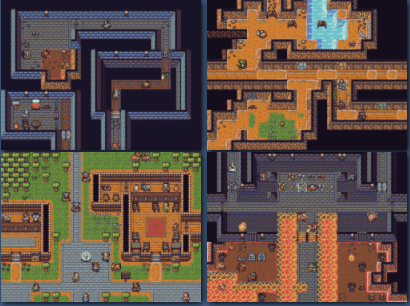
I did a quick search for free rogue graphics yesterday and found an astonishing quantity of rogue type graphics in sizes varying from 8 x 8 (pixels), 10 x 10, 16 x 16, 32 x 32 and 64 x 64. I haven’t quantified these sizes exactly but the 16 x 16 ones seems to be the most frequent and so that’s what I’ll pick. This post on Reddit provided links to many free (and some paid), most on the OpenGameArt website.
As a programmer sorting out graphics, it can be a very time consuming thing to do, so expect to spend a lot of time on it. You’ve got to satisfy yourself that you have enough graphics. Not just for terrain (e.g. dungeons and cities) but also for monsters. There are artists who will draw you more on sites like fiverr.com but that’s all cost. If you can draw or recolour then that’s a major plus.
Recolouring is another problem. With game graphics, you ideally want them all from the same source or else you’ll have the problem of mismatched sets. Nothing jars visually more than mixing graphics with different palettes. I’m no artist but even I can tell when something works and when it doesn’t.
Also there’s the question of perspective. The Dawnlike graphics are a sort of mix of from above but with a slant so you see front walls. Whereas something like the Kenney rogue game pack is front on. So you have to decide which you are going to go with.
My ideal game would be one of my favourites- Ultima 3. This is probably because its the only Ultima that I have played right through to the end and finished it! It was also the first. It took me about three months of one hour’s play a night. And I took copious notes. But as you can see its a bit more than a rouge like game! Those screenshots are from a CBM-64 which had a 320 x 200 screen (the image below is a composite of nine screens) borrowed from https://imgur.com/gallery/UvrzmBt. You can of course get the PC version sof Ultima III (and I and II) from gog.com. (Note these are straight links not affiate. I receive nothing from them). I did buy Ultima I-VI from gog.com.
The tutorials from About.com continue with the 7th one (of about 30) published. This is about C strings which are really just pointers to an array of characters. Once you understand pointers strings are easy enough to understand.
C is not a great programming language for string handling. To do a lot of manipulation is tedious and error prone. You’ll find safe versions of many of the standard functions for things like string copying and appending. The difference between the safe functions and the non-safe functions is that the safe functions include a maximum length.
For example strcpy() is used to copy a string. It’s definition is this:
char *strcpy(char *dest, const char *src)
That is, it copies a string pointed to by src to a string pointed by dest and confusing also returns a pointer to dest. What a waste of a function. It could have returned an int saying how many characters were copied instead. Because it relies on src pointing to a string (char *) that terminates with a null (or 0). If the null is missing it can copy a lot more characters and that’s how buffer overflow bugs happen. So you have strncpy which is defined as this:
The original rogue used graphics. This was back in the era of terminals and home computers and graphics could be quite limited. So there’s a tradition of using text. However if you do a google image search for rogue game like I did here, you can see that while many of them are text there are a couple that are graphics.
So the question is do you use graphics or text?
Text has the advantage that its just there. All you have to do is choose the appropriate character.
Plus if you use Unicode (always a bit of a pain in C but doable) then you have access to hundreds of thousands of different characters. Like this one:
Graphics on the other hand can be a lot more colourful but you have to get them drawn, or acquire them from somewhere like kenney.nl. So not an easy one to decide. If I had the resources I’d use graphics, but I’ll keep to the tradition of using Text.
A tip. When you have a question like “What characters are used in rogue” just try it. There is so much information on the web that there’s a good chance that someone will have done it. I’m finding this more and more and sure enough, I found this on Reddit. How would you have ever found that out before the web existed?
It’s just a little bit of C. I compiled it with these three compilers. MS VC (16.7.7 on Windows) gcc, and clang on Ubuntu 20.04 LTS. MS VC picked up the _Noreturn and complained, gcc 9.33 compiled it with not a whisper while clang 10.0.0 warned about void in the main function but compiled it anyway.
Both the clang and gcc compiled files ran and as you’d expect sat in an infinite loop until I control-c’d it.
However soon MS VC will compile it. According to this blog entry, MSVC from 16.8 preview 3 supports C11 and the _Noreturn feature (which tells the compiler that the function never returns) will be ok. Both gcc and clang support C11 so no problems.
When would I use such a function, you might ask. IO can’t see me using it much unless I wnt to write a background thread function that just runs forever. I have indeed written such a function recently but it was in Delphi not C. Another use is a function that exits perhaps vi a jmp. It also lets the compiler know so it can optimize return code away.
As I said, I don’t think I’ll be using it much if at all.
As well as games programming, I like game design and one of the best ways to practise this arcane art is to look at other people’s ideas and borrow/pinch/steal/be inspired by them.
The image is here is from a game Fiasco by a designer called Jason Morningstar of bullypulpitgames.com. It’s such a different game (they call it a weird game) and you can see what it’s about on their Fiasco page as well as look at the various downloads.
Why I like it is because it gives you a flavour of tv shows with complex plot lines like Fargo. There are several ‘players’ involved and you’re never quite sure how things are going to turn out; there’s not what you would call a hero. You don’t get that in many computer games so anything that can advance the art is very welcome.
OF course turning it into a computer game would present some challenges. But I’d play it!
Here’s a little C function. It’s not exactly intuitive what it does and I’ve renamed it to prevent giving it away.
  float mystery( float number )
  {
    long i;
    float x2, y;
    const float threehalfs = 1.5F;

    x2 = number * 0.5F;
    y  = number;
    i  = * ( long * ) &y;
    i  = 0x5f3759df - ( i >> 1 );
    y  = * ( float * ) &i;
    y  = y * ( threehalfs - ( x2 * y * y ) );
    return y;
  }
If it helps, this line is really the heart of it.
i = 0x5f3759df - ( i >> 1 );
Mystified? Well it’s a fast inverse square root. No one really knows who wrote it though John Carnack of Quake and Doom fame popularised it. There’s an interesting discussion about the author but no one really knows.
There’s less need for this type of thing nowadays because of all the fast silicon but back 20-25 years ago when graphics processors were in their very infancy, it was a highly useful optimization. Mind you , you’d need to know assembly language inside out to come up with stuff like this.






 The original rogue used graphics. This was back in the era of terminals and home computers and graphics could be quite limited. So there’s a tradition of using text. However if you do a google image search for rogue game like I did here, you can see that while many of them are text there are a couple that are graphics.
 As well as games programming, I like game design and one of the best ways to practise this arcane art is to look at other people’s ideas and borrow/pinch/steal/be inspired by them.