Bizarre Flutter bug – case insesitivity
 For the last month or two, I’ve seen this error come up. I’m developing on Windows 11 and using the most update Flutter/Dart in Quail 2 (Android Studio).
error: The argument type 'HexGridManager (where HexGridManager is defined in

d:\development\Onslaught\onclient\lib\flags.dart)' can't be assigned to the parameter type 'HexGridManager
(where HexGridManager is defined in
D:\development\Onslaught\onclient\lib\flags.dart)'. (argument_type_not_assignable at [tiled_game_app] lib\tiled_game.dart:298)
The error is it thinks a class that is defined in a file is not the same class as that same class in that same file (yep bizarre!) because the capitalisation of the Drive path differs. D vs d.
I’ve searched the whole project folder for the path using Notepad++ and it turns up surprisingly in 1473 places but when I copied that and looked for a path with a lower case d: it found none.
There is a simple fix. Just close Android Studio and then reopen it. The bug is no longer there.
 This happened to me when trying to compile/run a Flutter application on Windows. It’s quite an irritating bug and searching online found a 3-year old
  A recent update saw Flutter compiles on Ubuntu broken due to an issue with lld. This was only on Flutter installed under snap. To fix it, I removed Flutter and reinstalled it from Git. There were a few issues after that so I’ve documented them here. This is the process.
![Target dart_build failed: Error: Failed to find any of [ld.lld, ld] in LocalDirectory: '/snap/flutter/149/usr/lib/llvm-10/bin'](https://learncgames.com/wp-content/uploads/2026/01/linux-flutter-build-error.png) So I’ve been working on my game and to save time build the web project as a Linux app. It compiles it and runs it quicker than doing it with Chrome. Until yesterday.
So I’ve been working on my game and to save time build the web project as a Linux app. It compiles it and runs it quicker than doing it with Chrome. Until yesterday.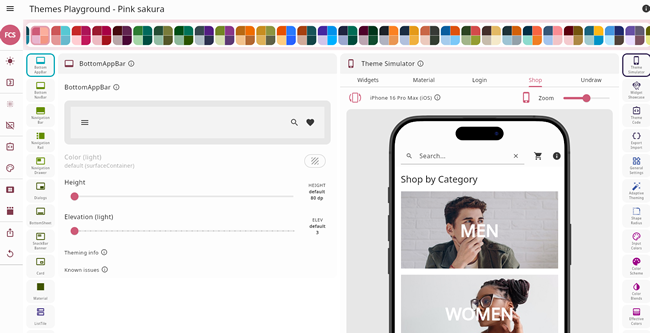 One of Flutter’s big strengths is its supports for theming; you can define or change colours for every aspect of your UI but it can be a bit complicated. Now an open source project provides a way to simplify things. It’s called