Author: David

Debugging C# on Ubuntu and you get

Debugging C# on Ubuntu and you get

vs-debugger-popup

So you’re trying to debug C# code on Linux, maybe Ubuntu. You’ve installed .NET 6 or 7, you’ve built your solution in Visual Studio on your Windows PC, published it then copied the files over to the Linux box. But when you run it, you get an error “Unable to find debugger script at”. It’s time to debug your Linux app from your Windows Visual Studio.

Now there is a Microsoft support issue for this and it’s less than helpful. Read below to see how I fixed it.

Only, as soon as it tries to attach over SSH (with username, password, IP etc), you get this popup on the left. “Computer says no”.

Looking in the VS Output folder you see the text below or something similar. For whatever reason, it failed to create a hidden folder in your home folder. To fix this, all you have to do is create that folder. It’s .vs-debugger under your home folder.

If you’re not familiar with .folders on Linux, note that the . at the front of the name means it’s a hidden folder. A simple ls command will not reveal it. If you use the File Manager, you can click the settings in the top right and tick the Show Hidden Files. Then you can do a cd ~ followed by a mkdir .vs-debugger. And View in files to confirm that it’s there.

Now the only pain with debugging is that the application must be running for Visual Studio to attach to it. I was debugging a utility that is run, does its business and closes. So to debug it, I added this as the first line in main() in program.cs

Console.ReadKey();

So run it, let it sit waiting for a key then attach visual studio’s debugger to your app over SSH, add your breakpoints and hit a key. Simples!


Compiling C with Visual C++ 2022

Compiling C with Visual C++ 2022

monitor displaying programming languageIt’s been a few years since I compiled the code for the first eBook and I needed to create an SDL application on Windows. I copied a project, as it was the fastest way to setup the include and lib paths, and the lib files needed to compile.
Compared to clang/gcc on Linux, setting up visual studio projects on Windows can be a bit of a pita. You’ve got to be careful not to mix up the x64 and x86 files, add everything twice (once for Win 32 and once for x64).

So I copied .sln and .vcxproj files, started compiling and kept getting this error:

Error LNK2019 unresolved external symbol main referenced in function “int __cdecl invoke_main(void)” (?invoke_main@@YAHXZ) maze D:\development\LinuxFormat\maze\MSVCRTD.lib(exe_main.obj) 

I messed around with settings, still no joy. did a bit of searching around and found that some people fixed it by setting the Link System Subsystem but that didn’t fix it. Also one person had forgotten to add SDL2_main.lib to the list of lib files to be linked in.

Then I noticed the project was defaulting to 64-bit. I checked my includes and it was only setup for 32-bit. D’oh. So copying the settings from 32-bit to 64-bit fixed it.

Single key compile with Visual Studio Code

Single key compile with Visual Studio Code

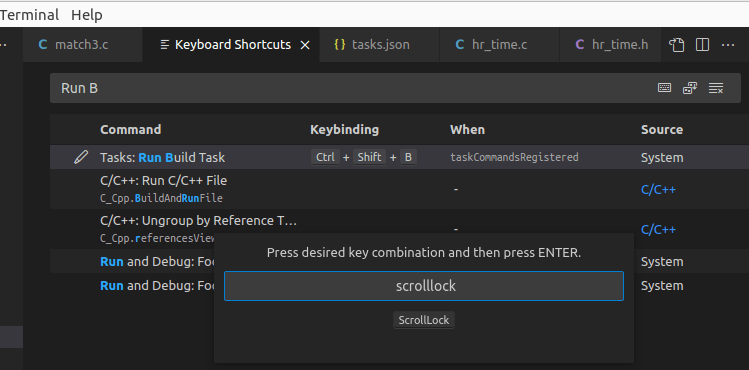
Set Keyboard ShortcutsOn Linux (Ubuntu and Raspberry Pi OS) I use Visual Studio Code,  but compiling or more specifically on the Terminal menu,  Run Build Task defaults to Ctrl-Shift-B. Being lazy and a long time user of Visual Studio with it’s F6 key, I decided to change this.

First get the Keyboard Shortcuts form up. This is done by Ctrl K, Ctrl S. Jusr hold the control key down then press k then s. You should see this form appear.

Then type in Run B to have it filter and just show the Command we want to remap. Double click that first line and a popup will appear. Press the Scroll Lock key or some other key (warning, most seem to be used!)  and press enter and voila, it now compiles when you press the Scroll Lock key. Another possibility is the Pause key which is next to it.


Yet another curious bug

Yet another curious bug

MatchThree latest version with a bugI’m aware that C is notorious for unexpected behaviour (UB). Let me describe this bug:

My second game in C + SDL for my newest eBook is Match Three and compiled with Clang-11 on my Raspberry Pi 4B. I’m getting a weird bug that doesn’t occur when I compile it on Windows under MSVC; the only differences between the source code on the PI and Windows are the paths to SDL and the sn._s calls but there aren’t many of those. Also I compiled it with clang-14 on Ubuntu 22.04 LTS on a Hyper-VM and that behaves properly.


Each piece is held a struct in a 10 x 10 array. One field is  called size. It’s 0 normally but if it is set to a value, typically  64 then it counts down, one per frame and the piece is drawn rotated by 8 degrees each frame. When it reaches 0 the piece is removed. This is my “down the plughole” way of removing pieces. It takes exactly 64/60 seconds to vanish. I use the size field to draw it when size is non-zero so it shrinks as it rotates It’s a nice effect.


The bug though is that when it starts up, several pieces start rotating and keep rotating. The size field stays at 63. There’s no code that explains this behaviour and it only happens on the Raspberry Pi, not on Windows or on Ubuntu. Is it a compiler bug or some weird UB on the PI version. It’s an interesting bug and I’ve only wasted a week of evenings on it so far!

New Linux Timing Code

New Linux Timing Code

silver and white round analog watch

For some time, I had a problem with my old Linux timing code. The units hr_time.h/c had to have the includes arranged in the right order and some flags set for it to compile. Plus it never seemed right having to do this in hr_time.h

#include <linux/time.h>
#define __timespec_defined 1
#define __itimerspec_defined 1
#define __timeval_defined 1

But today I found some better code on this SolarianProgrammer website and I’m always happy to give credit where it’s due. I’ve witched to using C17 which clang on Ubuntu (clang 14) and Raspberry Pi (clang 11) both seem to accept.

So now my hr_time.h looks like this:

hr_time.h

#pragma once
#include <stdlib.h>
#include <time.h>

void startTimer();
void stopTimer();
double diff();

hr_time.c

#include "hr_time.h"
#include <time.h>
#include <stdlib.h>
#include <stdio.h>

struct timespec start;
struct timespec end;

void startTimer() {
	if (timespec_get(&start, TIME_UTC) != TIME_UTC) {
		printf("Error in calling timespec_get\n");
		exit(EXIT_FAILURE);
	}
};

void stopTimer() {
	if (timespec_get(&end, TIME_UTC) != TIME_UTC) {
		printf("Error in calling timespec_get\n");
		exit(EXIT_FAILURE);
	}
};

double diff()
{
	return  (double)(end.tv_sec - start.tv_sec) + 
			((double)(end.tv_nsec - start.tv_nsec) / 1000000000L);
}

I’m only ever using one timer, if you want to modify this to pass in a timer in the startTimer and stopTimer then it’s easy enough.

A free eBook about the Game of Life

A free eBook about the Game of Life

Front cover of Conway's Game of Life eBook.Remember the cellular automation Life? I covered it in previous blog entries John Conway’s Game of Life and also Portable Life in C. Well, Associate Professor Nathaniel Johnston (in the Department of Mathematics and Computer Science at Mount Allison University in New Brunswick, Canada) and Dave Greene wrote a book/eBook about Life. It’s N. Johnston and D. Greene. Conway’s Game of Life: Mathematics and Construction.

The 474 page eBook is free on this page or you can buy the coloured hardback book. On Amazon that’s a modest £59.99! The PDF is 93 MB in size.

Ever since Life was publicized in Scientific American in the 1970s, it’s held a fascination for many including myself. I wrote a program (in Basic) 45 years ago to run it, but it was quite slow. One of the fastest I ever saw was written in 6502 assembly language running on an Acorn Atom. A very comprehensive and fast open source Life is Golly, written in C++ and is scriptable in Python or Lua.

But back to the book. If you are a real life afficionado and know the difference between a Glider and an Oscillator then this book/eBook is definitely for you. It’s a detailed look at Life from an academic point of view.


Is C a portable language?

Is C a portable language?

brown and black suitcase with red and yellow plastic toyI occasionally write answers on Quora.com and many recurring questions are about assembly language. Now I used to write games in 6502 and Z80 assembly language when the only alternative was Basic. But assembly language is very tedious to write, painstaking and it’s slow to write programs in assembly language. Most of your code is moving values between memory and registers or vice versa.

Anything major you write will not easily port onto a different CPU or Operating System. A Mac uses a different CPU to most Windows PCs and a Raspberry Pi uses a similar CPU design to a Mac (M1 or M2) but there are still differences in calling OS routines on Raspberry Pi OS (based on Debian) and Mac OS.

Higher level languages are generally portable. I’ve written C# code that runs on Linux and my game which was 2,200 lines of C needed about an hours work to run on Ubuntu Linux and Raspberry Pi.

But if you have a large complex C application, it may have issues when porting it.  A developer Rex Jaeschke wrote a book on portability and published it in 1989. He’s recently updated it and it’s available on Wikibooks.  It’s called Portability and the C language and is several hundred pages long. If you ever want to port C, it is very worthwhile reading. I’ve added a permanent link to the Link to C utilities page.


Is Tiobe Index misinformation?

Is Tiobe Index misinformation?

news, false, conceptEvery month a new Tiobe Index is published purporting to show the most popular programming languages. Except, if you look at other programming language popularity surveys, lists etc, the Tiobe Index increasingly seems to be at odds with everybody else.

Take the programming language C. As you can imagine I have a particular interest in it. I was at first delighted when I saw it at #3 in the Tiobe Index. In fact, in their most recent index it is listed as the 2nd most popular programming language. Well that is just crazy. No matter how much I might want it, there is no way on Earth that it is the 2nd most popular programming language.

It’s not just me saying it. Let’s look at who else says it.

SiteC's RankingComments
Tiobe Index2Updated monthly
GitHub Octoverse Programming languages9Annually- this is October 2022
Reddit Programming languages10Subreddits for programming languages
Red Monk Programming Language Rankings10June 2022. Updated every 6 months
StackOverflow developer survey11Annually
Statista most used programming languages 202211
Hackerrank Developer skills report 202312

There are other programming language lists or surveys but those show what I mean.  No one else has C anywhere that high. Here it’s in positions 9-12 with an average roughly around 10.5 if you exclude Tiobe or 9.3 if you don’t.  I think their methodology is flawed and biased by age. Older languages appear to carry more weight.

Never mind C, what about JavaScript? Everyone else has it in first place (except HackerRank who has it in 4th). Tiobe index has it in 7th. Misinformation is defined as “false information that is spread, regardless of intent to mislead.”. Maybe that’s a bit harsh but that’s how I regard the Tiobe Index.

Nice to see an article favouring C

Nice to see an article favouring C

brown wooden letter c decorToptal.com is a site for recruiting freelances for projects. They have published an article by a developer Daniel Munoz which praises C and shows how it is still quite relevant today. It’s definitely worth a read.

Given the pressure today to move to Rust, Go and even Kotlin, it’s nice to see someone praising C.  Of course for the games I do C is near perfect.

Posted in C
How to debug programs using SDL

How to debug programs using SDL

Terminal fprintf outputThere’s nothing worse than a program halting with a simple “Segmentation fault” and no idea where or why. It happened to me today working on the 2nd eBook (for Raspberry Pi) and I had to figure out where it was going wrong.

In the end it was a really silly bug, I was trying to load masks but had left the masks/ folder out of the filename.

How did I find it? I sprinkled a few fprintf(stderr,”message”); throughout the program changing “message” to something appropriate and launched it from a terminal. I’d thought it was in a function LoadTextures() so added a call before and after but you can see that worked and the segmentation fault happened after LoadTextures().

So I added it before and after LoadMasks() and my second run it happened before it reached the After LoadMasks message.

Note, I used stderr as the output path because, unlike stdout which is buffered and can be cleared, anything sent to stderr appears immediately.  More about this in this offsite article.

The using SDL part of the title is just to show that you can find bugs even in programs that use SDL.