I saw this the other day. A GitHub project for Linux that installs a quick way to run snippets. You download the zip file from GitHub let the archiver handle it then right-click extract the folder to somewhere, typically in your home folder.
Then you cd into the extracted folder and from the terminal run
./install.sh
To install it. After that open a new terminal to pick up the changed paths. You can type in
lacy -h
to view the commands. You can see in the screenshot above where I tried it in Ubuntu.
If you have an application made up of multiple source and header files, it’s possible that you use global variables in those source files. Remember, these are variables declared outside of any function.
Now you may not know it, but by default, those variables are visible to other files through what is known as external linkage.
Slap extern on the definition and the compiler and linker will happily use it. For instance in the Asteroids game, there is an extern int variable used in the file asteroids.c.
// external variables
extern int errorCount;
This is declared in the source file lib.c and when all the modules are linked together the linker sees all the compiled symbols and figures out which refers to which.
Making your program robust
If you don’t want global variables in one file to be accessed from another, just add the keyword static in front of the declaration like this.
static int errorCount = 0;
Now then, even though you’ve got the extern, when you compile it you’ll get an error. This is what Visual C++ says.
Severity Code Description Project File Line Suppression State
Error LNK2001 unresolved external symbol _errorCount asteroids D:\writing\Amazon EBooks\GamesProgrammer\publishing\Learn C Games Programming\Windows\Code\asteroids_ch48\asteroids\asteroids.obj 1
Error LNK1120 1 unresolved externals asteroids D:\writing\Amazon EBooks\GamesProgrammer\publishing\Learn C Games Programming\Windows\Code\asteroids_ch48\asteroids\Debug\asteroids.exe 1
So obviously only do this with global variables that are not going top be referred to. In this case we do refer to errorCount in Asteroids.c so adding the static would make no sense.
On the Match three game, I’m at the point where I need to be able to click on a piece and drag it to the next piece (horizontal or vertical) and then start the two animating to swap positions.
In SDL, I’ve got a simple mouseclick function that is called from ProcessEvents (my function for handling all input) with the x,y coordinates on the screen where clicked. These have to be converted from screen coordinates to board coordinates (or ignored if not on the board) to identify the piece clicked. However the mouse now needs to drag this piece to an adjacent piece.
As usual I’m not the first person to ask this and there’s a StackOverflow Question with an answer. So I’ll be following this answer and hopefully get it working. This is possibly the key mechanic in a MatchThree game so it’s important to get it right. After that I’ll get teh touchscreen working again which should in theory use the same code apart from reading the game controller..
This is for C99 and later. Prior to this, in function you had to declare all the variables that would be used in that function before any code. Since C99, you can declare them nearer to where they are used.
This function is from the Asteroids game. The declaration of the two variables hx,hy could have been moved to just before the do-loop. They can’t be declared inside the do-loop because they are used after it.
// doHyperJump() find empty space on screen fo PlayerShip
void CheckJump() {
	int hx, hy;

	if (jumpFlag && SDL_GetTicks() - jumpTimer > 3000) {
		jumpTimer = SDL_GetTicks();
		jumpFlag = 0;
		do {
			hx = 65 + Random(SCREENWIDTH - 130);
			hy = 65 + Random(SCREENHEIGHT - 130);
			if (IsEmptySpace(hx, hy)) break;
		} while (1);
		Player.x = (float)hx;
		Player.y = (float)hy;
		Player.vx = 0;
		Player.vy = 0;
	}
}
This is one of those cases where it doesn’t really matter. But generally I will declare them close to where they are first used and I almost always declare the for-loop variable in the for-loop. Only if it’s needed afterwards do I declare it after, but that is a slightly iffy use unless you want to check the value it had when it exited the loop.
Remember the scope of the variable i.e. the part of the function in which the variable can be accessed starts just after it is declared. By keeping declarations near the code, you reduce the scope and this can help robustness.
A couple of weeks ago I looked at GitHub. Now it’s time for Sourceforge. Like GitHub, it’s an open source repository and has been around for well over 15 years. Instead of using search parameter there are filters that let you specify games, types of games, programming language and project maturity.
The screenshot shows the games part of the filter, what you can’t see is further down in the Programming languages where I’ve ticked C and Status where I’ve ticked Production/Stable. So SourceForge contains 67 production ready Role-playing games in C.
You have to us the status or else you’ll get 100s of projects that have been started then abandoned, often without any code. One or two projects have migrated to GitHub, so their code here is old.
I have some ideas for big multi-player games myself but I’d like to try a novel approach. The game clients run on your computer and communicate with a server. However it’s not real-time but sends commands to the game server via a web interface and can check for results the same way. If you like, it’s a modern take on postal gaming except that used printers and the postal service to send printouts. Of course with WebAssembly, it could run in your browser.
I’ve managed one blog entry per day for the last 134 days but a change in side project (I was writing a book to be published, not an Ebook) but that has to be delayed by at least a year because of an issue at the publisher. In fact I may just publish what I’ve done as my 2nd Ebook.
I’m currently working on networking on a Raspberry Pi. Unfortunately it has to be in C# not C. Networking is a lot easier in C#- you have OOP, task parallel library (far easier than threads), thread pools,. concurrency with async/await and a lot more. And I can use C# with .NET core or Mono on the Pi.
That said, I will still continue on with game development on the PI. I’ve got my Match Three game half done; I’m quite proud of it and want to get it finished. But I may switch to a slightly less frequent blog posting schedule…
For some reason malloc seems to confuse new programmers but it’s very straightforward. I didn’t use it or even talk about it in the ebook. Memory allocation is not something you want to be doing in a game loop, running 60 times a second. All the memory that was ever used in the asteroids game was for text strings, variables and arrays and you don’t have to explicitly allocate any memory for those.
When you have a program that needs to allocate and free memory, like say a compiler or text editor then you grab a block of RAM using malloc. You have to specify how much RAM you need and you must type cast it, because malloc return a void *.
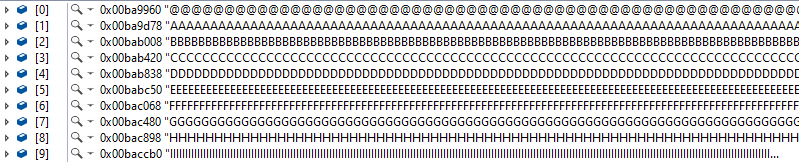
Here’s an example. The image shows the output in the Visual Studio debugger.
#include <stdio.h>
#include <stdlib.h>

char* ptr[10];
int main() {
	for (int i = 0; i < 10; i++) {
		ptr[i] = (char *)malloc(1000);
		char* aptr = ptr[i];
		for (int j = 0; j < 1000; j++) {
			aptr[j] = i + 64;
		}
        }
	for (int i = 0; i < 10; i++) {
		free(ptr[i]);
	}
}
This is what the Visual Studio debugger shows just before the final loop that calls free.
It has allocated 1000 bytes of memory for each of the ten char * in ptr[] and then fills it with 1000 each of the ASCII values 64..73 @
Finally, it frees up the memory using free. For every malloc, there should be a corresponding free or else your program will develop a memory leak.
It’s a macro that checks an expression, and if that expression isn’t true (.e. non-zero) it outputs a message and halts the program.
Here’s an example.
#include
#include

int main() {
	int x = 0;
	assert(x != 0);
	printf("It is the end");
}
Because x is 0, it triggers the assert and the program never reaches the printf statement. It’s a bit of a crude tool. In other programming languages like C++ or Delphi it raises an exception which can be handles but C of course does not have exceptions.
My own preference is to check the value for example making sure a pointer is not null and nthen displaying an error but other programmers prefer to use assert and have it kill the program if things go wrong.
When you press the control key, the player’s ship will accelerate in whatever direction (0-23) it is facing. To make this possible, I pre-populated a couple of float arrays with values x and y for thrust in any of the 24 directions.
This function populate the two arrays. These are declared as
It uses trigonometry to calculate the horizontal and vertical amounts for any of the angles 0,15,30..345 degrees. As sin and cos functions work in radians rather than degrees, the variable radianValue is calculated from the degree angle by multiplying by the value degreesToRad. If you remember your school trigonometry, one radian = 180/pi degrees. So the code divides by this value (or multiplies by its inverse in this case).
Then when you press the control key, it just adds the appropriate thrustx and thrusty value to the vx and vy variables. Simple and fast.
The screenshot is of an open source command line editor for Dos, Windows and Linux called TDE which is short for Thomson Davis Editor.
As the website says “TDE is a simple, public domain, multi-file/multi-window binary and text file editor written for IBM PCs and close compatibles running DOS, Win32 (console) or Linux. TDE is suitable for editing batch files, binary files, text files, and various computer language source code files (with configurable syntax highlighting). The only limit on the number and size of files that TDE can handle is the amount of memory. Likewise, the only limit on the number of windows is the amount of memory. There is no preset maximum number of files or windows that may be open at any one time.”
What interested me with this was that the editor should work for Linux. It includes a viewer mode where files are loaded read-only, file search (text or regular), can load files as binary, run a file as a Macro and display several source files with formatting. It certainly sounds a loty better than nano which is a terminal editor.

 I saw this the other day. A GitHub project for Linux that installs a quick way to run snippets. You download the zip file from GitHub let the archiver handle it then right-click extract the folder to somewhere, typically in your home folder.


 A couple of weeks ago I looked at GitHub. Now it’s time for
 This is what the Visual Studio debugger shows just before the final loop that calls free.
 It’s a macro that checks an expression, and if that expression isn’t true (.e. non-zero) it outputs a message and halts the program.
 The screenshot is of an open source command line editor for Dos, Windows and Linux called