Author: David

A tictactoe (aka noughts and crosses) game in C

A tictactoe (aka noughts and crosses) game in C

TicTacToe aka Noughts and Crosses
Image by Kevin Phillips from Pixabay

I was asked to write this a few month’s back and it took me 2 or 3 evenings. It’s 312 lines long in just one file. Hopefully there are enough sensible function and variable names to make sense of it.

It runs in a terminal. It was compiled with Visual Studio but should not need many changes to compile with gcc/clang. (I hope!).

I made extensive use of pointers. For instance this function uses pointers in a for-loop.

int InDanger(char piece, int * x, int * y) {

    for (*y = 0; *y < 3; (*y)++) {
        if (CountRows(piece, y,0)==2) return 1;
    }

    for (*x = 0; *x < 3; (*x)++) {
        if (CountCols(piece, x,0) == 2) return 2;
    }
    *x = 0;
    if (CountDiagonal(piece, x,0) == 2) return 3;
    *x = 2;
    if (CountDiagonal(piece, x,0) == 2) return 4;

    return 0; // no danger
}

I’ve added this to the GitHub C games repository and updated the C games source page.

Useful reference to C operators

Useful reference to C operators

Reference
Image by ElasticComputeFarm from Pixabay

Ever wondered what all the operators that you can use = are. Like ^=. Or what about operator precedence? Does * come before ++? (Answer no, ++ is higher precedence than *).

Do you know how

a & b == 7

is parsed? It’s actually a & (b==7)

This Wikipedia page lists all the operators with precedence order and as it includes C++, it lets you see what you can and can’t do in C and C++.  It’s worth bookmarking whenever you need to look these things up.

Playing Solitaire in a terminal

Playing Solitaire in a terminal

Solitaire in a termianalI thought this looked quite neat so I’ve added it to the C Codes Link page. It’s a game of Solitair (the Klondike version) running in a terminal.

It’s quite a detailed explanation of how its been implemented and of course it’s all in C. If you know of any games written in C (and open source), please let me know and I’ll add them.

A simple programming challenge

A simple programming challenge

Contest
Image by Arek Socha from Pixabay

Background

Around 1981, a British computer magazine (Personal Computer World) had a programming contest and this was one of the puzzles.

There are many 9-digit integers in the range 123456789 to 987654321 where each digit only ever appears once. What is the 100,000th number in this sequence?

Example

The first number is 123456789, the second is 123456798, the third is 123456879 and so on. No digit can repeat so 122345675 is not a valid number in this sequence.

The problem was “Write a program in C or C++ that outputs the 100,000th number as fast as possible. Use any algorithm, except you cannot pre-calculate the answer and then write a program that just prints the result (Somebody actually tried it). Your entry must calculate the number!”.  I’ll give this a month so the deadline is August 14th 2020. Please don’t copy any of the existing answers- you can with a bit of poking around and yesterday’s blog entry find some answers to this.

Prize?

Er fame and glory and a mention on here!

Note

It’s possible to solve this by hand. I did, back in 1981. It took me 20 minutes with a pen and paper. I also wrote a 6502 assembly language version of it than ran on a Vic-20. It took something like 10 hours to count up to the correct answer.

The Wayback machine-slightly offtopic

The Wayback machine-slightly offtopic

There is a wonderful website (archive.org) that makes a backup of websites. It even has one of this blog, taken on April 30th. It’s remarkable.

The reason I mention it is because I was looking at the backup of cplus.about.com, a website that I managed (curated, wrote tutorials etc.) on “Programming in C, C++, C#” (and even Go) between 2006 and 2013.  One of the things I ran there was a set of programming challenges and by the end I’d done a whopping 70 of them. I came up with the idea, published it, then adjudicated entries.

This page has a list of 65 of them.  There may be more from a later date but no more than 70.

As I can now gain access to most of them, I’m going to rerun a few here. starting with the first which I’ll publish tomorrow.

Who needs asm? cc65 C compiler

Who needs asm? cc65 C compiler

Commodore Computer
Image by OpenClipart-Vectors from Pixabay

Back in the day 1984-1989, I wrote games in Z80 and 6502 assembly. It would be another 10 years before I learnt C++ and ten years after that for C. But I would have killed to have had a C compiler that generated 6502 code back then. Writing assembly language code is slow and painstaking. You have to remember whats in each register (A,X and Y) and what you are using page 0 locations for.

It takes the same length of time to write and debug 10 lines of 6502 assembler as it does to write 10 lines of C.  But those ten lines of C can do way more than 10 lines of 6502 assembly.

On a 6502 which is an 8 bit CPU with 16-bit addressing, memory goes from 0-65535. It takes two bytes for an address unless it is in the first 256 bytes (0-255) which only needs 1 byte. You can optimise your code by using page 0 for many variables. It only takes 2-byte instructions to fetch them from memory and write them back. The first byte is the instruction, the 2nd the address. Compare that with the rest of memory where instructions are three bytes long with 2-bytes for the address.

CC65 is a C compiler that generates 6502 code. It’s mostly written in C. I’ve added a permanent link to it on the C Codes link page. Pictured is a CBM-64 like the one I used to own.

Deciding what level features to be used in the Match Three game

Deciding what level features to be used in the Match Three game

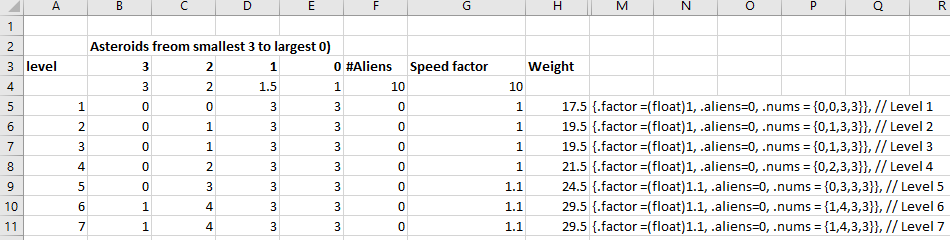
Match Three gameI’m at the point of deciding what features will be included in the game and then determining what % of features are used on each level. how to make the game harder etc. As with asteroids I’ll use Excel.

These are features to enhance the game and maybe increase difficulty.

  • Wanted animals. Most levels have a target of a number of pieces of one type. The level is completed when all of that piece have been removed. These ‘wanted’ animals are shown onscreen with a count of how many remain.
  • Locked pieces. On some levels, pieces are randomly locked. The lock is removed only when the piece is in a matched line or in the area affected (from bonus pieces). Locked pieces do not move even if there is a space beneath them. For really hard levels, two locks can be used on a piece. Each lock has to be removed.
  • Skulls. Some levels have a number of skull pieces to be removed. This can only be done by removing pieces below so the skull drops and eventually reaches the bottom row where it is automatically removed.
  • Timed levels. Some levels will have a count down timer; so many animal pieces have to be removed before the timer runs out.
  • Bonus Pieces. These appear when a 4-match, a 5-match or a 6-match occurs and show special pieces- a 4-piece, 5-piece etc. Two 4-pieces dragged together clear a 5 x5 area of all pieces (remove locks on locked pieces). Two 5-pieces dragged together wipe out all pieces in both the row and column. A 4 and a 5-piece together wipe out all animal pieces of the animal piece (picked randomly) next to the 5-piece. Two 6-pieces together wipe out all pieces on the board (locked pieces aren’t wiped, just unlocked). A 6-piece dragged on a 4-piece or 5-piece wipes out all pieces in 3 rows wide and 3 columns deeps.
  • Board Rotation. The board can be rotated clockwise or anti-clockwise. This allows spaces created under locked pieces to be possibly filled. It also helps get rid of skulls that are now on the bottom row. But some levels start with a number of board rotations. Once used up, the only way to earn them is to do something like drag two four-match pieces together.

So now I have to decide how these fit together on the different levels, what weighting each has and calculate a difficulty score that should increase as you progress through levels. Oh the joys of game design!

Back writing book two

Back writing book two

Hexagons
Image by Clker-Free-Vector-Images from Pixabay

This time it’s about Learning to program games in C on the Raspberry Pi. Most of the books I’ve seen are about programming in Python, but C combined with SDL2 gives you an edge. I already know that I can get 150 frames per second in Asteroids on a Raspberry Pi 4B.

The three games for the book are

  1. Asteroids. Fully developed
  2. MatchThree. About 1/2 developed.
  3. Empire type game. Map generator plus large scrolling hexagon map with fog-of-war shrouding and computer AI opponents. This will be based on the existing Empire code.

The third game is one I originally wrote thirty-three years ago (Dark Empire) in Z80 assembler for the Zx Spectrum. I then converted all 5000 lines of code into CBM-64 6502 assembly in one month working seven all-nighters, with the last three on three successive days. That one wasn’t in hexagons but squares and of course there was no mouse.

On the morning after the last all-nighter I drove across Manchester to deliver the tape master copy to a railway station to be sent to the publisher in London and when I got home, I slept for 24 hours solid. I doubt I could do an all-nighter now, but 33 years ago …


How to run C snippets quickly

How to run C snippets quickly

lacy utility to run C snippetsI saw this the other day. A GitHub project for Linux that installs a quick way to run snippets. You download the zip file from GitHub let the archiver handle it then right-click extract the folder to somewhere, typically in your home folder.

Then you cd into the extracted folder and from the terminal run

./install.sh

To install it. After that open a new terminal to pick up the changed paths. You can type in

lacy -h

to view the commands. You can see in the screenshot above where I tried it in Ubuntu.

How to stop access to Global variables in C

How to stop access to Global variables in C

Links
Image by PIRO4D from Pixabay

If you have an application made up of multiple source and header files, it’s possible that you use global variables in those source files. Remember, these are variables declared outside of any function.

Now you may not know it, but by default, those variables are visible to other files through what is known as external linkage.

Slap extern on the definition and the compiler and linker will happily use it. For instance in the Asteroids game, there is an extern int variable used in the file asteroids.c.

// external variables
extern int errorCount;

This is declared in the source file lib.c and when all the modules are linked together the linker sees all the compiled symbols and figures out which refers to which.

Making your program robust

If you don’t want global variables in one file to be accessed from another, just add the keyword static in front of the declaration like this.

static int errorCount = 0;
Now then, even though you’ve got the extern, when you compile it you’ll get an error. This is what Visual C++ says.

Severity Code Description Project File Line Suppression State
Error LNK2001 unresolved external symbol _errorCount asteroids D:\writing\Amazon EBooks\GamesProgrammer\publishing\Learn C Games Programming\Windows\Code\asteroids_ch48\asteroids\asteroids.obj 1 
Error LNK1120 1 unresolved externals asteroids D:\writing\Amazon EBooks\GamesProgrammer\publishing\Learn C Games Programming\Windows\Code\asteroids_ch48\asteroids\Debug\asteroids.exe 1

So obviously only do this with global variables that are not going top be referred to. In this case we do refer to errorCount in Asteroids.c so adding the static would make no sense.