Author: David

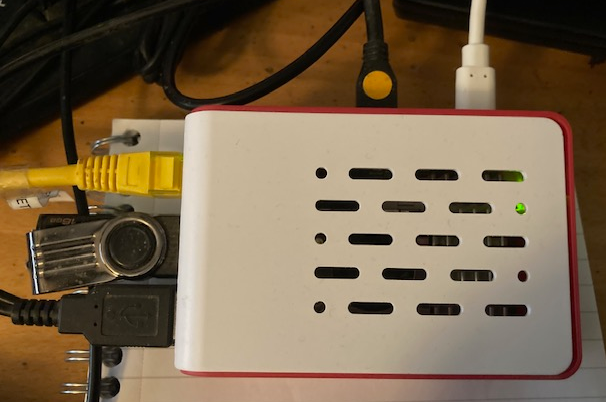
So I bought a Raspberry PI 5 and VS Code crashes!

So I bought a Raspberry PI 5 and VS Code crashes!

Crash on VS Code running on a Reaspberry Pi 5.

And the first thing I did after assembling it, was install VS Code and Rust.  And irritatingly, there’s some kind of a bug with the current version of VS Code. 1.97.

Open a project- say for a Rust application and view the source code. After a few seconds or so it crashes with a The window terminated unexpectedly (reason: ‘crashed’, code 5).

I also updated my Raspberry Pi 4B, installed Rust and got the same crash with it.

Thankfully Raspis come with grim which lets you do screenshots on Wayland.

Want to know if your system is running Wayland? From a terminal run this command:

echo “$XDG_SESSION_TYPE”

And you’ll either get wayland or x11.

So I hope the VS Code issue gets fixed soon.

Bit of a curiosity – Rust runs slower on Windows than Linux

Bit of a curiosity – Rust runs slower on Windows than Linux

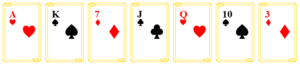
And it is a fair comparison because the Linux I’m running (Ubuntu 24.04 LTS) runs on my Windows 11 box in a hyper-V VM. I wrote a Poker hand evaluation program which loaded a text file containing lines of seven playing cards in text format TS 2C 4D sort of thing. It was seven cards because there’s two in your hand and five on the table.

There were 1,000 lines of these and the program loaded the file into memory, holding the cards in a Vec<Vec<Card>>. Then it loops through the 1,000 elements and figures out the best hand for each set.  The bit that was timed was the loop not the loading the file into memory.

The source file is on GitHub. It has the project files plus some test cards. You can try it yourself. Note at the bottom of this article is a link to a much faster version.

https://github.com/David-H-Bolton/Projects/blob/main/rust_pokerhand.zip

On my PC, the Windows one average time per hand is 768 ns. On Ubuntu is 540ns. Mad eh! The same program runs in 70% of the time on Linux compared to Windows. Both are run with this command from a terminal/command line.

cargo run --release 1000_card_hads.txt

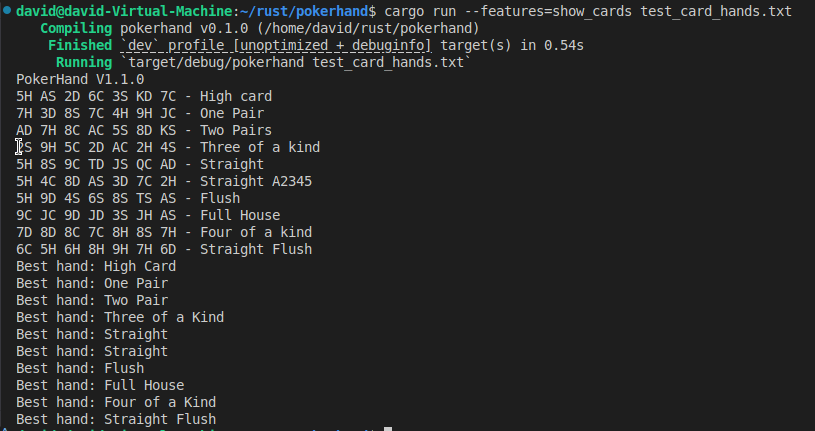
You can also try the test_card_hands.txt but you need to enable the show_cards feature. That shows the cards but doesn’t do timing. The default is do the timing but don’t show the cards or the evaluation.

cargo run --release --features show_card test_card_hands.txt

Shows the Rust program with the feature


The test cards say what each hand is and the output at the bottom is the program working out each hand.
The file

https://github.com/David-H-Bolton/Projects/blob/main/rust_pokerhand_faster.zip

contains a much faster version. On Linux it takes about 127 ns per hand. On Windows it’s about 190 ns.

So I found the fix

So I found the fix

It's fixed text on a technology backgroundWell actually I asked Microsoft’s CoPilot AI and it sorted it!

This is what you need in the dependencies section in cargo.toml

[dependencies]
sdl2-sys = "*"
sdl2 = { version = "0.37", features = ["image","ttf"] }

It compiled with no problems after saving that.

A slight problem with SDL2 and Rust

A slight problem with SDL2 and Rust

VS Code Rust SDL Copikle problemThis is on Ubuntu 24.04 LTS. I’ve installed the dev versions of SDL2, including images and TTF.  You can read how to install them in this tutorial.

Once that’s done you add them to the rust project with commands like this

cargo add sdl2

You can see these instruction in the relevant crates pages. For instance SDL2 crate, SDL2 Image and SDL2 TTF.

So far so good. The cargo add added the crates into cargo.toml as expected but when I compiled it. Not a compile error as such but a version of dll hell.

The text in that image says:

Updating crates.io index
error: failed to select a version for `sdl2-sys`.
... required by package `sdl2_image v0.25.0`
... which satisfies dependency `sdl2_image = "^0.25.0"` of package `sdl1 v0.1.0 (/home/david/rust/sdl1)`
versions that meet the requirements `^0.25.0` are: 0.25.0

the package `sdl2-sys` links to the native library `SDL2`, but it conflicts with a previous package which links to `SDL2` as well:
package `sdl2-sys v0.37.0`
... which satisfies dependency `sdl2-sys = "^0.37.0"` of package `sdl1 v0.1.0 (/home/david/rust/sdl1)`
Only one package in the dependency graph may specify the same links value. This helps ensure that only one copy of a native library is linked in the final binary. Try to adjust your dependencies so that only one package uses the `links = "SDL2"` value. For more information, see https://doc.rust-lang.org/cargo/reference/resolver.html#links.

failed to select a version for `sdl2-sys` which could resolve this conflict

The problem appears to be a clash between sdl-sys and sdl2-ttf or sdl2-image. If anyone knows a fix…


Rust’s way of importing from other modules is bizarre

Rust’s way of importing from other modules is bizarre

I come from a background of Pascal and Delphi. From about 1989 Turbo Pascal 4 and subsequently Delphi had a really useful unit system for breaking a program down into multiple source files. A unit is the equivalent of Rust’s mod.  Anything you wish to export from a unit is put in the interface section of the source file- consts, types, functions etc. Like making them pub in Rust. Then in the source file that wants to use these, you just put using name-of-unit. No hassles, very easy to use and it just works.

Now in Rust, they have a cockermanie system.  I had a main.rs that had several Structs (Card and Game) and decided to put it in another file poker.rs inside a mod poker {.

I made both Structs pub.  When compiling, there’s no errors in poker.rs but in the main.rs which has

pub mod poker;
use poker::{Card, Game};

There’s red lines under Card and Game.

note: struct `crate::poker::poker::Card` exists but is inaccessible etc. Grrr.

Rust compile errors


Now, no doubt there is soime way to make this work but why make it so difficult?

Rust – Sometimes you don’t need to use HashMap or HashSet

Rust – Sometimes you don’t need to use HashMap or HashSet

Seven playing cardsI wrote a Poker Hand evaluator. It read in a file of a 1,000 randomly generated sets of seven cards like this AC 8H JC …and figured out what was the best hand. It’s in Rust and on GitHub. That takes you to a projects folder and the whole rust project complete with two test sets of cards are included. Look for the file Rust_pokerhand.zip.

Now in the Hand evaluation I used both a HashMap and HashSet.  Here for example is the code to count how many of each Rank there are.

    let mut rank_counts = HashMap::new();
    for card in cards.iter() {
        *rank_counts.entry(card.rank).or_insert(0) += 1;
    }

The program reads in the cards into a Vec<Vec<Card>> and then calculate the average time to evaluate a hand.

Now there’s nothing wrong with the program. One of the card sets is called test_card_hands.txt and has an instance of each hand type along with a comment.

5H AS 2D 6C 3S KD 7C - High card
7H 3D 8S 7C 4H 9H JC - One Pair
AD 7H 8C AC 5S 8D KS - Two Pairs

You can run that with this command:

cargo run --release --features "show_cards" test_card_hands.txt

Or if you run the other test set with this, it doesn’t show the cards but does calculate the average time.

cargo run --release 1000_card_hands.txt

If I run this on Windows it evaluates a hand in 780 ns on average and on Ubuntu 24.04 on the same PC, (running under Hyper-V), it’s faster typically 550 ns.

So, I was looking for ways to speed it up and thought.  The HasmMap and HashSets are running on small numbers of Cards. 13 for Ranks and 4 for suits so what if I use them as arrays. Would it be faster?

It was, roughly four times faster.

As an example, the code above I replaced with this:

    let mut rank_counts = [0,0,0,0,0,0,0,0,0,0,0,0,0];
    for card in cards.iter() {
       rank_counts[&card.rank.value()-2] += 1;
    }

That needed a value() method that mapped all the Ranks starting at 2, onto 2-14.

I also redid the code for working out a straight.

The original is this, plus a bit more to check for A2345:

    let mut values: HashSet<u8> = cards.iter().map(|card| card.rank.value()).collect();
    let mut unique_values: Vec<u8> = values.drain().collect();
    unique_values.sort_unstable();

    let mut straight_length = 1;
    for i in 1..unique_values.len() {
        if unique_values[i] == unique_values[i - 1] + 1 {
            straight_length += 1;
            if straight_length == 5 {
                is_straight = true;
                break;
            }
        } else {
            straight_length = 1;
        }
    }
The improved version uses this constant

static STRAIGHTS: &'static [i32]=&[7936, 3968, 1984, 992, 496, 248, 124, 62, 31, 7681];

Plus a binvalue function which maps the card Ranks onto 1,2,4,8 etc. Just or the Cards binValues together and ‘ands’ (&) it with the individual STRAIGHTS values.

      let mut bivalue=0;
      for card in cards.iter() {
        bivalue |= card.rank.binvalue();
      }   

      for i in 0..STRAIGHTS.len(){
        if &binvalue & STRAIGHTS[i]== STRAIGHTS[i] {
            is_straight= true;
            break;
        }
    }
SDL3 is officially out

SDL3 is officially out

SDL3 on a monitor created by Claude.asi

SDL releases are few and far between so this is significant news. What’s new you ask? Well lots of things- best to read this page.

It’s highly cross-platform, SDL officially supports Windows, macOS, Linux, iOS, and Android, and several other platforms.  It’s written in C, works natively with C++, and has bindings available for several other languages, including C#, Python, and Rust.

One of the projects I’m working on is rewriting the Asteroids game into Rust with SDL3. I’ll publish more here as it proceeds.

A new year, new language

A new year, new language

Rusty computer by Copilot

I’ve switched to learning Rust hence the corny image.

It is an interesting programming language where the Rust compiler can stop you introducing bugs at compile time. It’s very strong on ownership of variables.  However my interest lies in the area of games and to that end you can

        • get  bindings for libraries like SDL
        • generate WASM for browser games.

It’s cross-platform and you can setup VS Code with a couple of extensions on Windows and Linux (Mac as well but I haven’t got oneto test that) though I noticed a curious thing.  The same program, built and run on Ubuntu in a Hyper-V is quicker than running on Windows. Both were optiomized builds – the Hyper-V Ubuntu took 266 ns, the Windows 388 ns.

It’s been a while

It’s been a while

Official Rust logo
Official Rust logo.

I’ve decided that I’m going to learn Rust and as the SDL2 bindings are available for Rust, I’ll be doing a bit of rewriting C into Rust. I’ve always found that working on some code is a good way to learn a programming language.